dbt Anvil logo dbt Anvil

dbt Anvil for Visual Studio Code

A VS Code extension that gives dbt the language support most developers assume already exists.
It didn't. Now it does.

🎬  In a world where SQL tooling was broken... one extension dared to fix it.  Coming to a terminal near you.

dbt Anvil demo movie

Stuff you'll actually use

Most of this is what you'd expect from any serious language extension: completions, hover, go-to-definition, diagnostics. Some of it you didn't know you needed until you see it work.

Column intelligence

Column intelligence preview

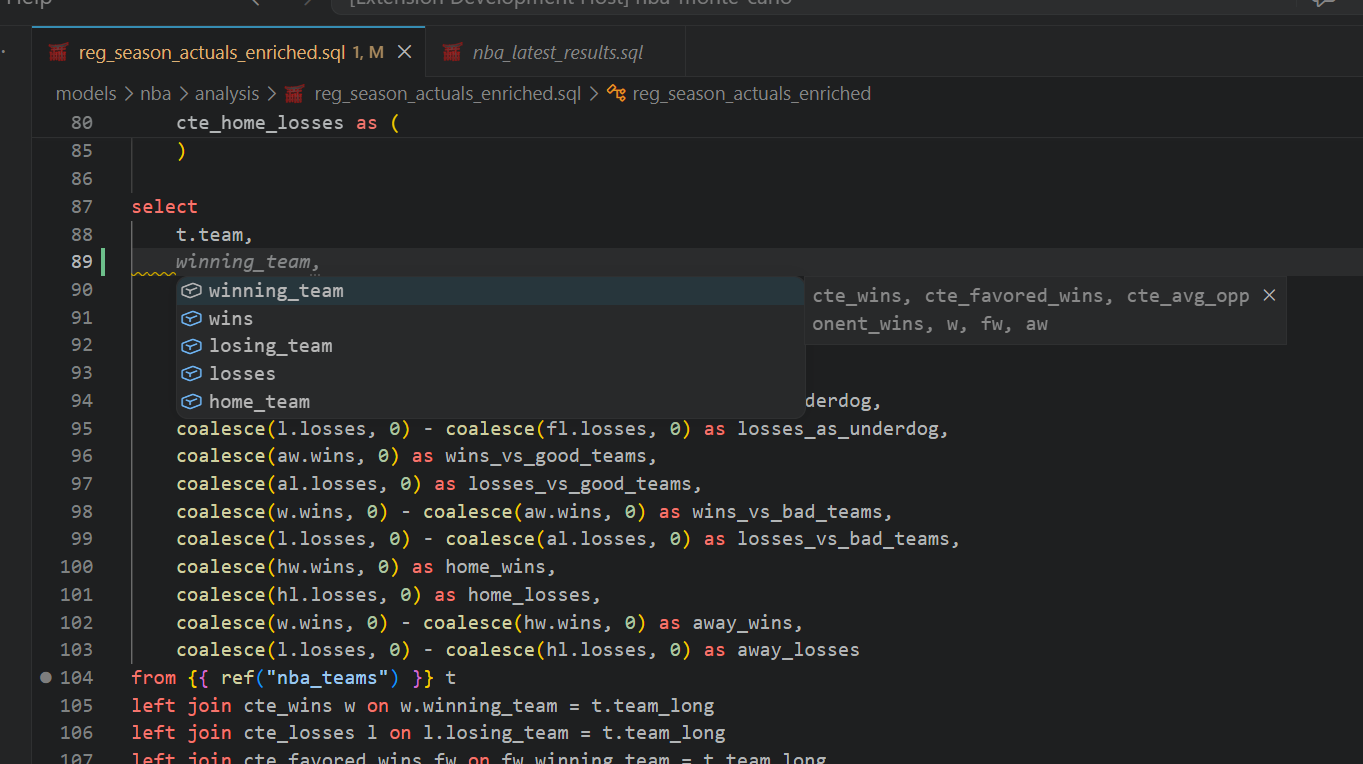
Type in a SELECT and get completions from actual upstream columns. Hover shows origin. Rename updates references across your project. It works through refs, sources, CTEs, joins, and YAML, without making you babysit metadata files.

Go-to-definition, find references, and call hierarchy work too. The full language server experience, for SQL and dbt. Finally.

Jinja-first parsing

Jinja parsing preview

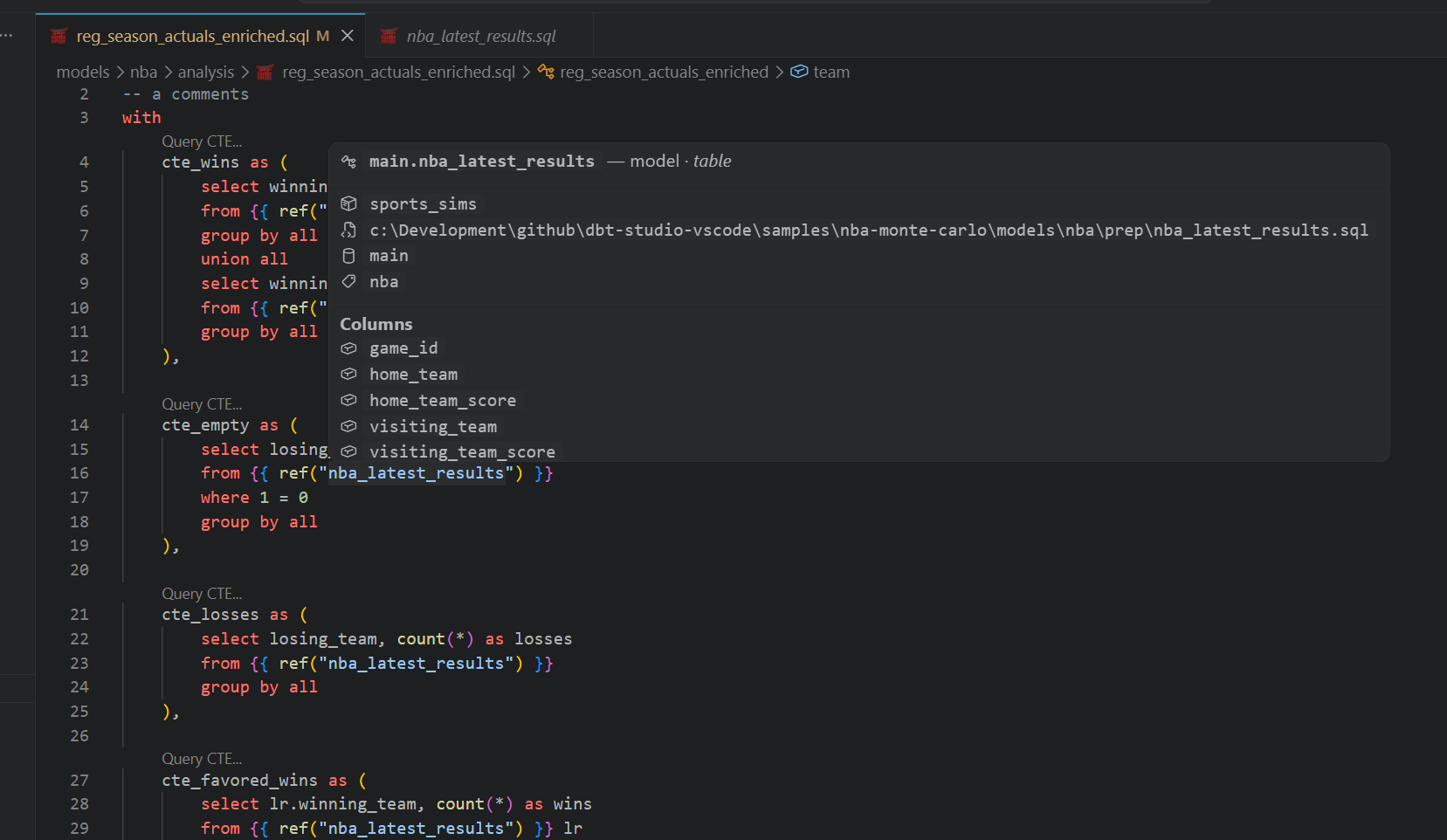
Most SQL tooling treats Jinja like noise. dbt Anvil treats it as a first-class layer, so completions, hover, diagnostics, and go-to-definition keep working inside {% if %} blocks, loops, and macros. Quietly, yes. Jinja ninja.

Macro calls get signature help as you type. Both Jinja-SQL and Jinja-in-YAML have dedicated grammars, so highlighting is accurate in model files and schema definitions.

Lineage + impact

Lineage impact preview

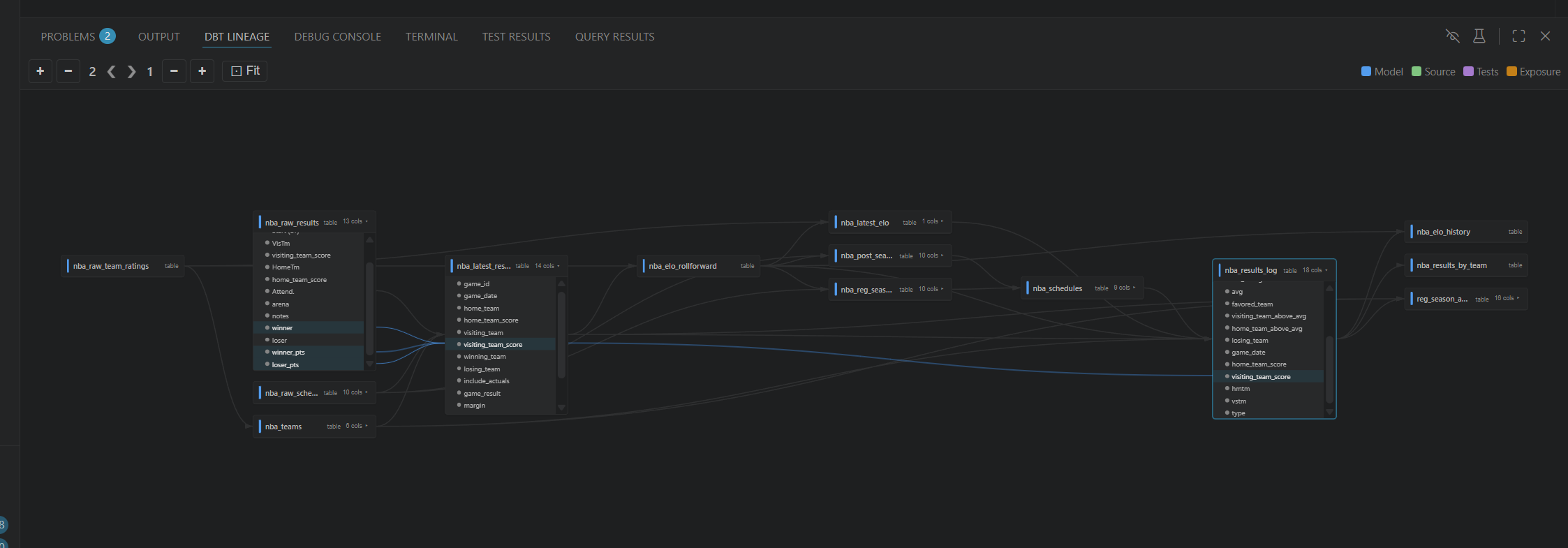
Interactive model and column lineage that follows your editor. Parsed SQL, not regex guesswork. Fast enough that you stop thinking about the tool and get back to shipping models.

Click into column-level lineage to trace an individual column through the DAG. Open a model and the graph updates. No manual refresh, no separate tool to open.

Debugger

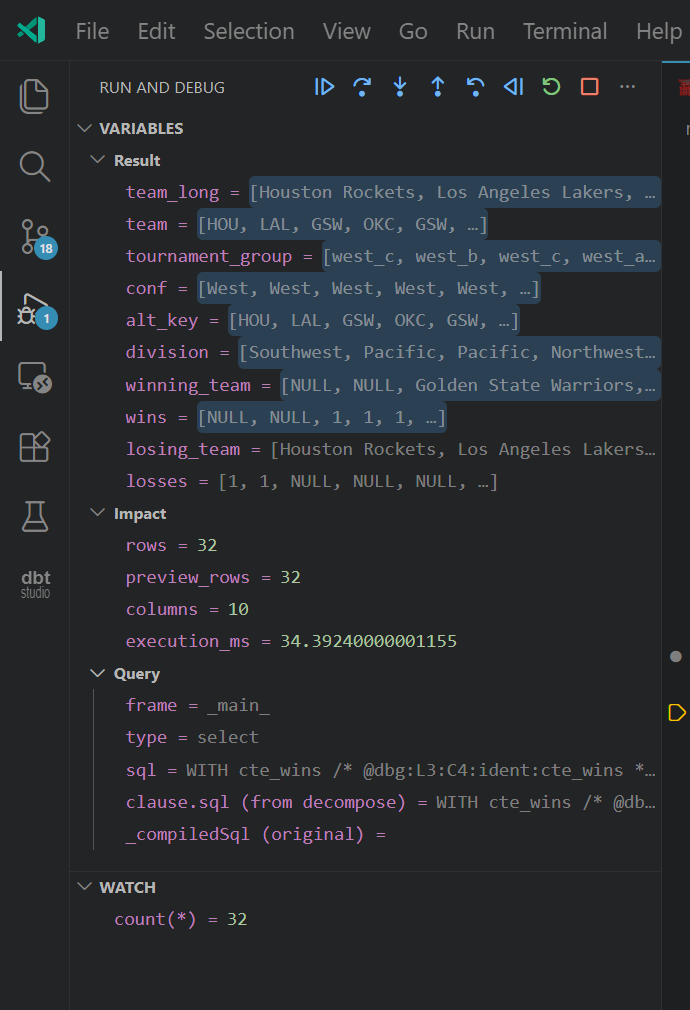
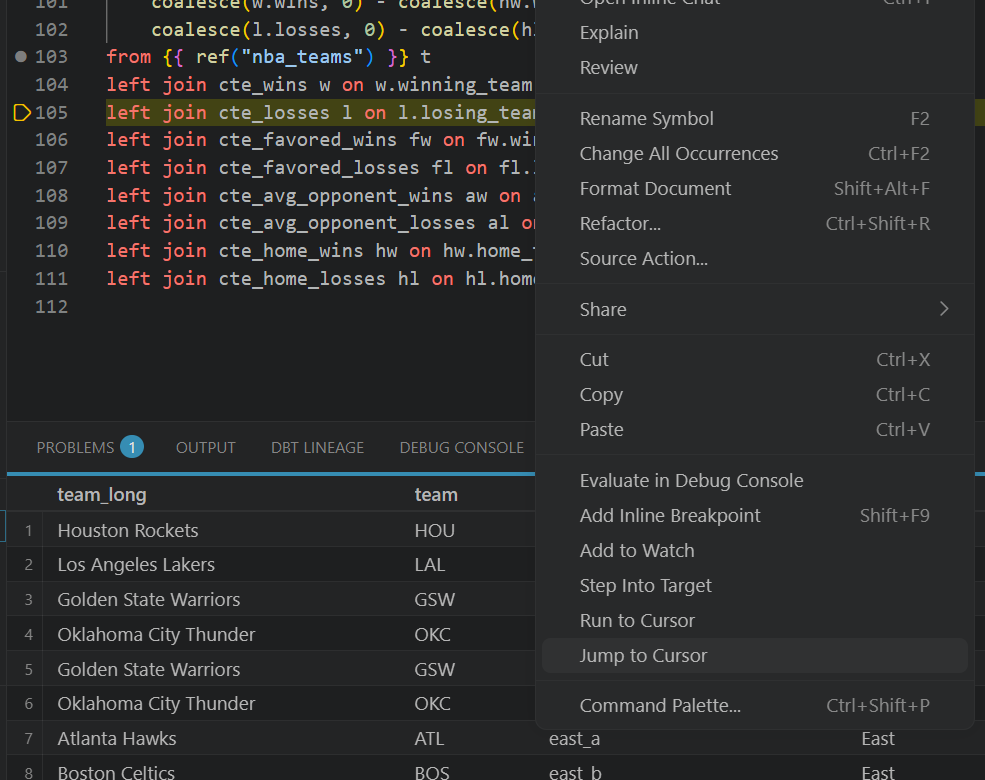
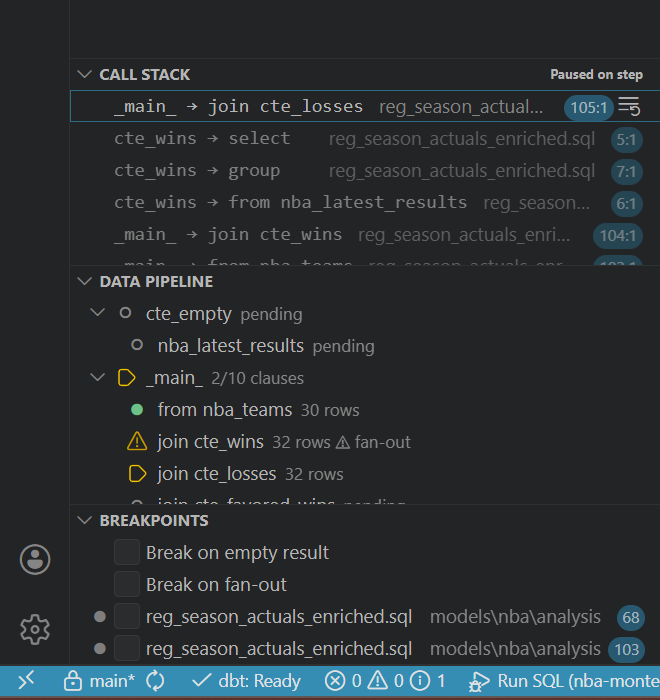
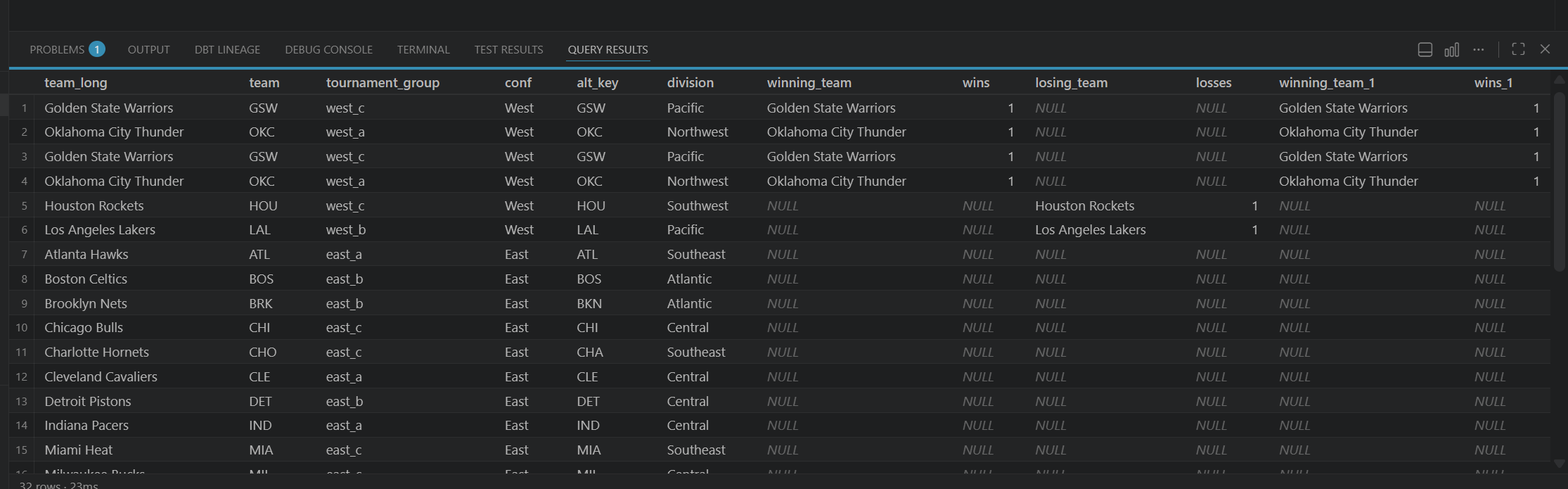
Debugger variables panel Debugger context menu and editor Debugger call stack and data pipeline Debugger query result display

Press F5 to run ad-hoc SQL (Jinja included). Step CTE-by-CTE with F10, step clauses with F11, and find exactly where row counts go from “reasonable” to “why is this 12x bigger?”

Step Back replays cached results (it's free). Edit a CTE mid-session and Restart Frame recompiles just that piece. Step Into a ref() and it opens a nested debug session for that model. Standard VS Code debugger UI throughout.

Profiler

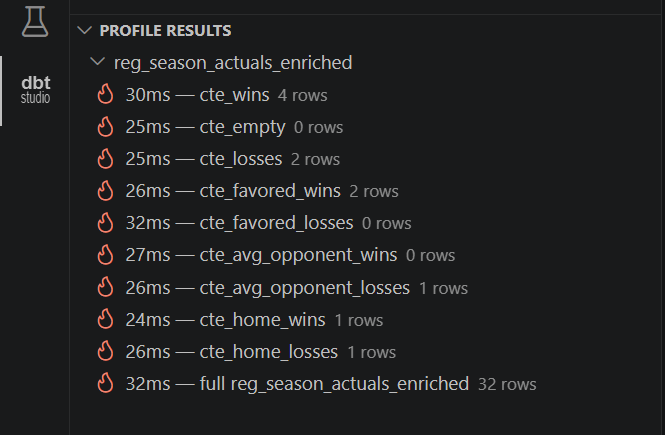
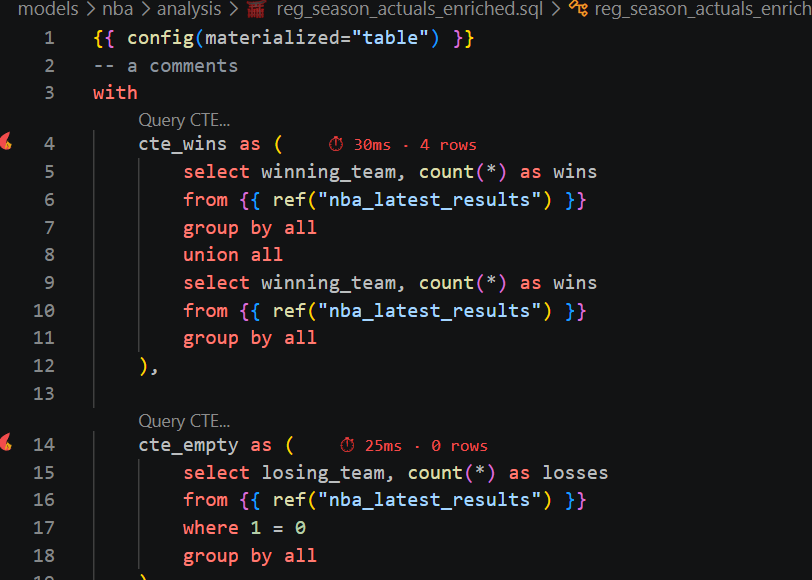
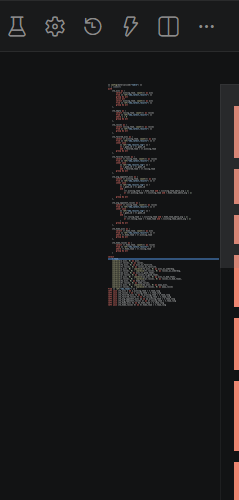
Profiler gutter and pipeline tree Profiler editor with flame markers Profiler minimap with performance heat indicators

Not a flame-graph profiler. A practical one. Runs each CTE, shows row counts and timing, flags hot spots in the editor.

Gutter icons mark the hot and warm CTEs directly in the file. The minimap shows a heat signature across the whole model so you can see the expensive parts without scrolling. Often that's enough to find the CTE scanning 40 million rows when it should be scanning 40.

Ninja

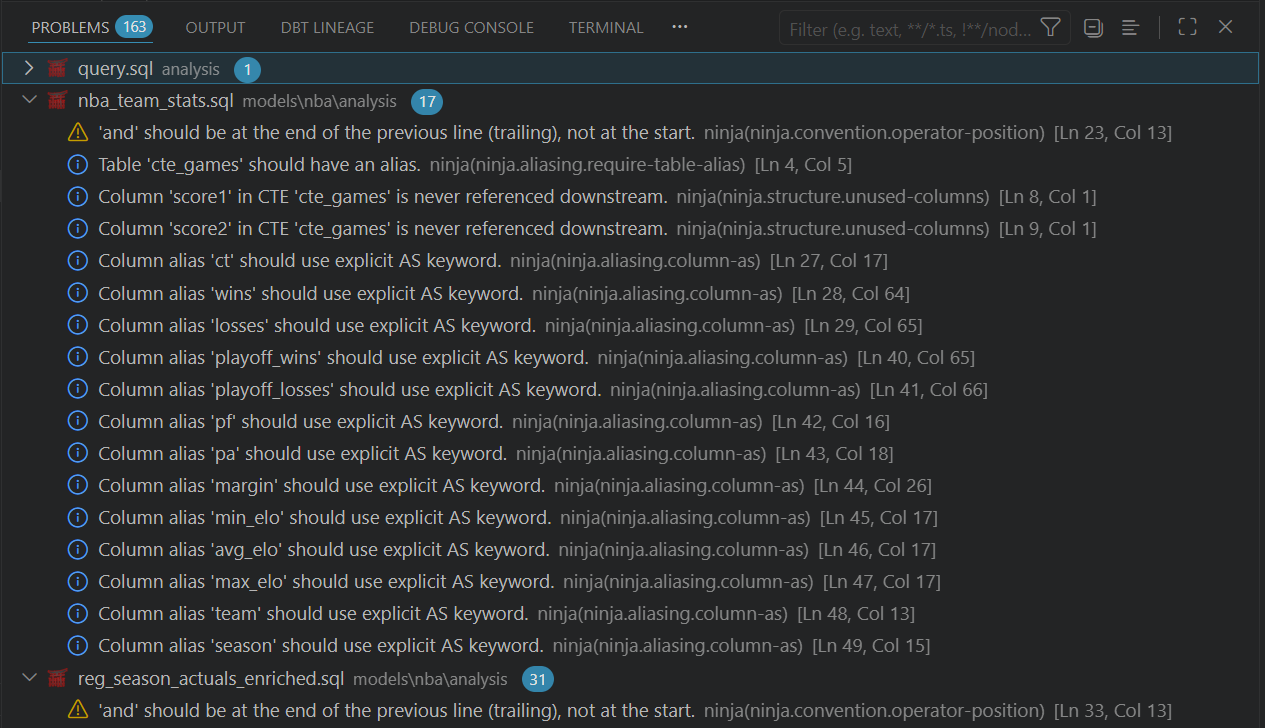
Ninja diagnostics: aliasing, unused columns, operator position rules

The same parser that powers completions now enforces your SQL style. Capitalization, aliasing, layout, structural checks, all on the AST that's already there. Zero extra parse cost.

Violations appear inline as you type, and workspace-wide diagnostics let you scan every model at once. Reads your existing .sqlfluff config. Fixable rules auto-correct on save.

Copilot toolset

GitHub Copilot

Copilot gets real tools: project metadata, lineage/impact analysis, direct warehouse queries, plus run/test/build/compile workflows. These are not canned responses. It can actually do the work and report back.

14 tools in total, covering project info, dependency tracing, column lineage, warehouse queries, and dbt execution. Ask Copilot what would break if you dropped a column. It will check.

SQL edit & query

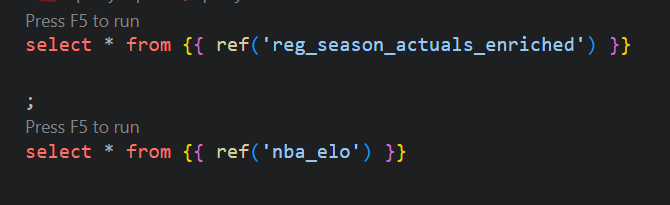
Run queries against your warehouse directly from VS Code: ad-hoc SQL, a full model, or a single CTE in isolation using the model::cte_name convention. Jinja compiles first, so {{ ref() }} and macros work exactly as they do in production.

SQL editor with Jinja refs and Press F5 to run hints

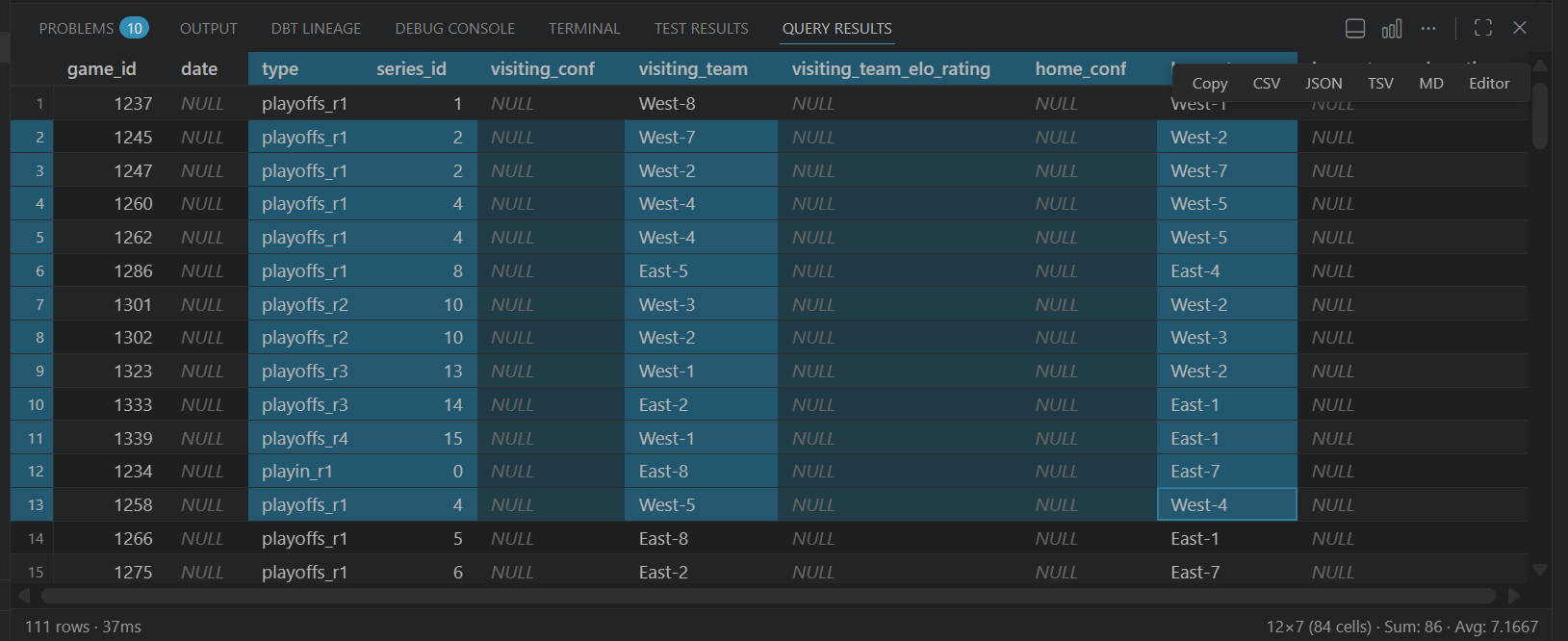
Results land in a grid with per-column statistics: null counts, distinct values, min/max, mean. Select a range of cells and the status bar shows a live sum and average. Export to CSV, JSON, TSV, or Markdown, copy as-is, or open directly in the SQL editor. Excel-style handling without leaving VS Code.

Query results grid showing row data, column stats, and export options
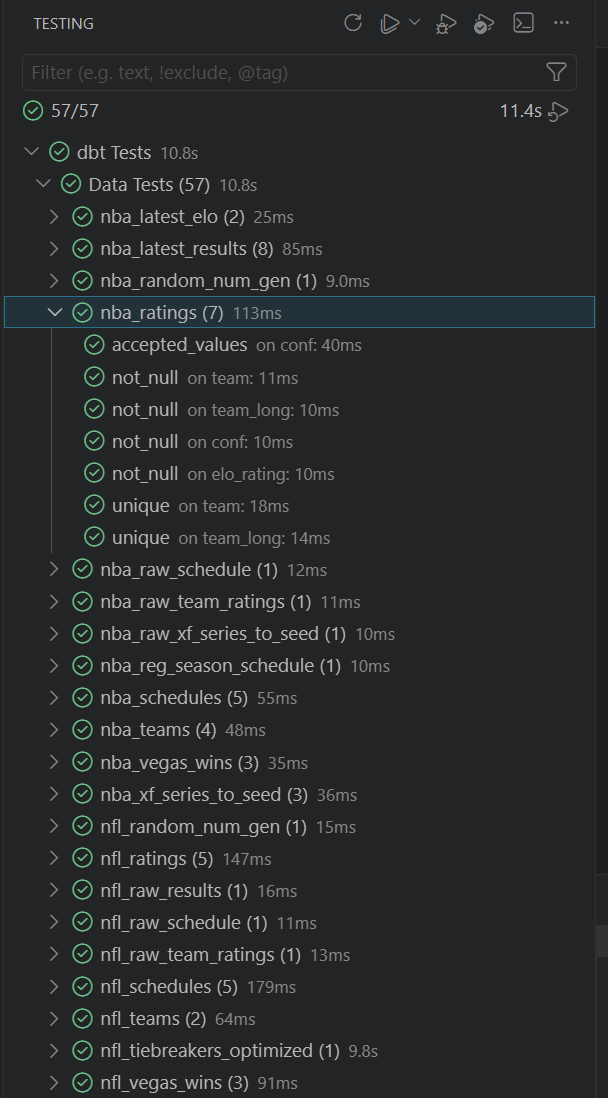
VS Code Testing panel showing 57 passing dbt tests grouped by model

Testing

Most dbt tests are data quality checks: not_null, unique, the occasional accepted_values. Useful, but not what a developer means when they say they want to test their logic. dbt does have unit tests now, and they are what developers actually want.

dbt Anvil at least makes running them less painful: results show up in a sidebar with pass, fail, and warn grouped by status, and the real error output is right there without digging through terminal logs. Tests integrate with VS Code's native Test Controller, so the Testing panel works too.

You can also test individual CTEs in isolation using the model::cte_name convention, useful when a model has complex intermediate steps and you want to verify one of them without running the whole thing.

Ninja

The same parser that powers completions, hover, and diagnostics now enforces your SQL style too. Ninja is a built-in linter and formatter: capitalization, aliasing, layout, structural checks, all running on the AST that's already there. No extra parse cost, no external process.

Keyword casing, trailing commas, implicit aliases, indentation, line length, unused CTEs, all configurable per rule with per-line suppression via -- noqa. Reads your existing .sqlfluff config if you have one.

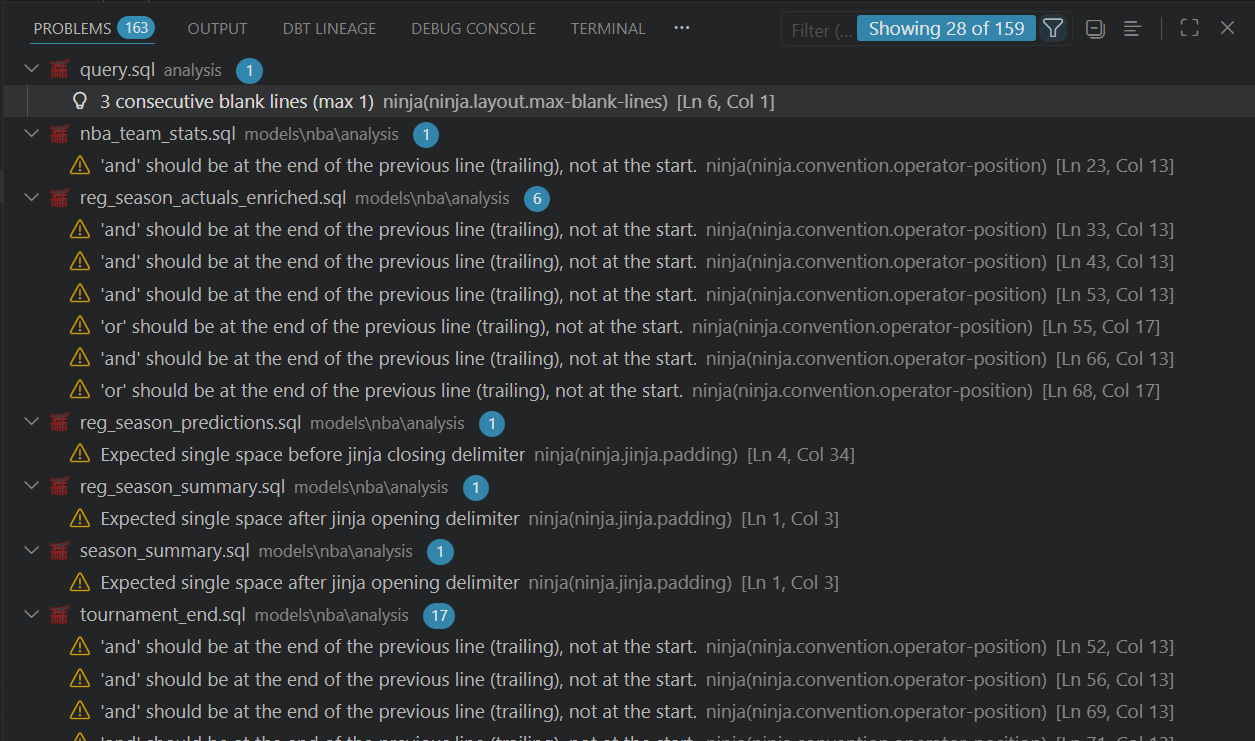
Fixable rules auto-correct on save or on demand. The rest appear as inline diagnostics, exactly where the violation is. And when you want the full picture, a single command runs diagnostics across every model in the workspace, so you can enforce standards project-wide, not just in open files.

VS Code Problems panel showing Ninja diagnostics across multiple dbt models

Getting started

  1. 1Install dbt Anvil from the VS Code Extensions panel, or directly from the Marketplace
  2. 2Open a folder containing dbt_project.yml
  3. 3The extension activates and starts indexing automatically. No setup required.*

* This extension is compatible with Visual Studio Code in its stable release configuration. Compatibility with the stable release does not constitute endorsement of the stable release. The stable release is fine. You should still be on VS Code Insiders. Furthermore, it is assumed that the end user is operating GitHub Copilot Chat at the time of installation, or will do so imminently, or is at least thinking about it. The extension does not require Python as a standalone dependency. It does, however, require a functioning dbt Core installation, the absence of which shall be treated as user error. Said installation will be located, interrogated, and put to work automatically. No configuration is necessary. None was ever necessary.  WARNING: use of this software has been linked to sudden and irreversible increases in work satisfaction, compulsive model refactoring, and in rare cases a complete loss of tolerance for bad SQL tooling. The author accepts no liability for productivity gains, existential crises triggered by finally understanding your own data lineage, or any civilisation-ending events that may occur as a direct or indirect consequence of installing a VS Code extension. Side effects include: shipping faster, sleeping better, and occasionally explaining column lineage to your manager using actual facts. If symptoms persist, open an issue.  This software is provided free of charge to the end user. All applicable fees have been prepaid in full by the author in the form of blood, sweat, tears, and an unreasonable number of late evenings staring at AST node representations of SQL clauses. No further payment is required. No refunds are available. No refunds have ever been available. This has always been free.

Everything, in detail

Every feature, listed. This is what ships today, not a roadmap, not a wish list.

Language support

  • Column completions: ref(), source(), Jinja blocks, column names, YAML schema
  • Hover info: model details, column metadata, source descriptions
  • Go to definition for models, sources, and macros
  • Find all references for models, sources, CTEs, and column aliases
  • Rename with F2: models (including the file), CTEs, column aliases, and inline aliases
  • Call hierarchy: see which models reference yours, and which yours references
  • Diagnostics: parse errors, unresolved refs, column mismatches, SQL syntax errors
  • Inline / restore ref: quick-fix to expand a ref() to its compiled SQL or restore it
  • Quick Fix: create missing model files from unresolved refs
  • CodeLens: per-CTE query actions inline above each CTE definition
  • Document symbols: navigate CTEs and model structure via the outline
  • Workspace symbols: find any model or source by name (Ctrl+T)
  • Signature help for Jinja macros
  • Syntax highlighting for Jinja SQL and Jinja in YAML

Navigation & project

  • Interactive lineage graph: model-level and column-level, follows your active editor
  • Model Explorer: browse the project tree with materialisation icons
  • Python env auto-detection: venv, uv, poetry, pipenv, conda, system
  • Disk caching: near-instant startup when cache is valid
  • Databricks SQL Statement API: direct queries, no dbt show needed
  • Per-feature toggles: turn off what you don't need, no window reload

Execution & debugging

  • SQL edit & query: ad-hoc SQL, full models, individual CTEs via model::cte_name
  • Result grid with per-column stats (nulls, distinct, min/max, mean), live selection sum/avg
  • Export to CSV, JSON, TSV, Markdown, or open in editor
  • SQL Debugger: step through CTEs and clauses with F10/F11, inspect intermediate results, step back for free, breakpoints by name or line, edit and continue, cross-model step-in
  • Model Profiler: per-CTE row counts and timing, gutter icons, sidebar summary, minimap heat signature
  • Test Explorer: pass/fail/warn by status, integrates with VS Code Testing panel
  • CTE isolation testing via model::cte_name

Copilot tools

  • run_models: run dbt models via node selection syntax; supports tags, paths, wildcards, full-refresh, fail-fast, and state:modified selection
  • test_models: run dbt tests with selection and exclusion; optionally generate CTE test models before running
  • build_models: run + test in one command; supports resource type filtering and state-based selection
  • compile_model: compile a model and return the generated SQL without executing it
  • get_project_info: project name, adapter type, model count, dbt version; optionally runs dbt debug to verify connection
  • list_resources: list all project resources with optional filtering by type: models, tests, sources, snapshots, seeds, exposures, metrics
  • get_resource_info: full details for any resource: columns, descriptions, compiled SQL, raw SQL, and tests; triggers compilation if needed
  • get_lineage: upstream and downstream lineage for any resource; configurable depth and direction
  • get_column_lineage: trace a single column through SQL transformations: CTEs, JOINs, aggregations; configurable depth and direction
  • analyze_impact: which downstream models, seeds, and snapshots are affected if a resource changes
  • query_database: execute SQL against the warehouse directly from chat; supports Jinja ref() and source(); can extract and query a named CTE from any model
  • install_deps: run dbt deps to install project package dependencies
  • load_seeds: load seed CSV files into the database; supports selection, full-refresh, state-based selection, and show
  • snapshot_models: run dbt snapshots to capture slowly-changing dimension records

Ninja

  • 38 built-in rules across 8 categories, 22 with one-click auto-fix
  • Runs on the same DocumentModel as completions and hover: zero extra parse cost, no subprocess
  • Capitalisation (4 rules, all ⚡): keywords, functions, literals, datatypes; upper, lower, or consistent-within-file policy
  • Convention (9 rules, 6 ⚡): != vs <>, count(*) over count(1), IS NULL instead of = NULL, COALESCE over IFNULL/NVL, LEFT JOIN not LEFT OUTER JOIN, explicit UNION ALL/UNION DISTINCT, comma and operator position
  • Ambiguity (4 rules, 1 ⚡): unqualified columns when multiple sources present, bare JOIN made explicit as INNER JOIN, bare UNION, redundant DISTINCT alongside GROUP BY
  • Aliasing (6 rules, 2 ⚡): implicit column aliases, missing table aliases in multi-source queries, self-alias, duplicate aliases, unused aliases, expressions in final SELECT without an alias
  • Structure (7 rules, 2 ⚡): unused CTEs (auto-deleted precisely), unused columns across CTEs, SELECT * inside CTEs, redundant ELSE NULL, boolean CASE simplification, unnecessary DISTINCT() parentheses, JOINed tables never referenced
  • Layout (7 rules, 6 ⚡): indentation style and size, line length, trailing whitespace, leading blank lines, consecutive blank lines, trailing newlines, space between function name and (
  • Jinja (1 rule ⚡): padding inside {{ }} and {% %} tags
  • Workspace-wide diagnostics: scan every model at once from a single command
  • Auto-fix on save for fixable rules, or on demand via the command palette
  • Per-line suppression via -- noqa or -- noqa: rule.id
  • Reads existing .sqlfluff config if present

Under the hood

This extension is a fair bit more ambitious than a thin wrapper around a language server. Here's what's in it.

No conflicts. dbt Anvil uses your existing Python environment and your existing dbt installation. It auto-detects your setup (venv, uv, poetry, pipenv, conda, system Python) and bridges the VS Code Node.js world to dbt Core over a JSON process boundary, with nothing to configure. All core dbt operations: parse, compile, run, test, build, seed, snapshot, and query, go through this bridge. No bundled runtimes, no parallel installations, no version mismatches. The one thing it cannot help with is a broken dbt setup. That part is on you.

Terminal monitoring. The extension also monitors your terminals. If a dbt command is detected that would conflict with something the extension is doing, or vice versa, it mediates. Running dbt from two places against the same target is a bad idea, and dbt Anvil knows when that's about to happen.

Not blindly executing dbt. It minimises database communication to only what is strictly necessary. The extension runs against its own separate dbt target. When it does something internally, it doesn't touch your schema.

Aggressive caching at every level. dbt is not invoked unless it needs to be. Parsing results, compiled SQL, column metadata, all cached to disk and reused across restarts. All dbt execution is coordinated through priority queues, because not all operations are equally urgent, and the extension takes advantage of that.

Adapter-aware where it counts. Query execution is optimised for Databricks (using the SQL Statement API directly, bypassing dbt show) and DuckDB (local execution). More adapters are on the way.

Built-in compiler, always running. For operations that do not require dbt at all, dbt Anvil uses its own compiler: a native TypeScript SQL and Jinja parser that runs in-process in the extension host — no subprocess, no worker pool, no startup cost. It re-parses the active document on every keystroke (not on save, every keystroke), providing instant diagnostics as you type. A typical model parses in a few milliseconds. The parser is purpose-built for dbt: one pass handles Jinja and SQL together, with exact source positions through templated code, and it keeps working inside conditional blocks instead of giving up at the first {% if %}.

Everything is toggleable. Some of what dbt Anvil does is opinionated, so every feature can be turned off individually from Settings. Changes take effect immediately, no reload required.

dbt Fusion support is planned. When it arrives, the debugger, profiler, and other execution-dependent features will be available there too. The extension doesn't depend on Python being part of your environment; in a Fusion world it may not be. At work we haven't gotten around to Fusion yet - it's a fairly large migration and we've been putting it off.